

Running a supermarket today is more complex than ever. From managing thousands of products and tracking inventory in real time to handling fast checkouts and multiple payment methods, supermarket owners need technology that simplifies operations rather than complicates them. This is where choosing the best free supermarket POS software becomes critical.
A modern POS app is no longer just a cash register. It is the backbone of daily operations, helping businesses control inventory, manage staff, analyze sales data, and deliver a smooth customer experience. For small and medium supermarkets especially, finding a free POS system that is powerful and reliable can significantly reduce costs while improving efficiency.
This guide explores what makes a POS system ideal for supermarkets, the key features to look for, and why Cashier POS stands out as one of the best free POS solutions available today.
Organize your sales in seconds with Cashier POS!
Take control of sales and users in moments, and give your business a fully integrated system that runs smoothly.
Get Started For FreeWhat Is a Supermarket POS System?
A supermarket POS system is a combination of software and hardware designed to manage sales transactions and retail operations in a fast-paced retail environment. Unlike basic cash registers that only record payments, a modern POS app integrates sales, inventory, pricing, promotions, reporting, and payment processing into one unified platform. This integration enables supermarkets to automate routine tasks, reduce manual errors, and maintain consistent control over daily operations.
For supermarkets, a POS system must handle a wide range of operational demands, including:
- High transaction volumes during peak shopping hours without slowing down checkout performance
- Barcode scanning to ensure fast, accurate product identification
- Real-time inventory updates that reflect every sale, return, or adjustment instantly
- Multiple payment methods to meet diverse customer preferences
- Promotions, discounts, and loyalty programs that encourage repeat purchases and increase basket value
A free point of sale system tailored for supermarkets allows businesses to access these essential tools without heavy upfront investment. This makes professional retail technology accessible to small and growing supermarkets while still supporting efficiency, accuracy, and long-term scalability.
Why Supermarkets Need a Specialized POS App
Supermarkets operate differently from other retail stores due to the scale, speed, and complexity of their daily operations. They deal with fast-moving consumer goods, frequent price changes driven by suppliers and promotions, and large inventories that require constant monitoring. A generic POS solution may struggle to handle these demands efficiently, leading to slow checkouts, inventory inaccuracies, and limited visibility into business performance.
A specialized supermarket POS app is designed specifically to address these challenges and offers several critical advantages:
- Faster checkout speed during peak hours through optimized barcode scanning and streamlined cashier workflows
- Accurate inventory tracking to avoid stockouts, overstocking, and losses caused by expired or unsold products
- Better control over pricing and promotions, allowing managers to quickly adjust prices and apply discounts across multiple products or categories
- Detailed sales analytics for smarter decisions, helping supermarket owners understand customer behavior, product performance, and profit margins
Choosing the right online POS or offline POS system directly impacts customer satisfaction, operational efficiency, and overall profitability. A reliable POS platform ensures smooth daily operations while supporting long-term growth in a competitive retail environment.
Key Features of the Best Free Supermarket POS Software
When evaluating a free POS system for supermarkets, certain features are non-negotiable.
1. Inventory Management
A supermarket POS must track inventory in real time. Every sale should automatically update stock levels, helping managers know exactly what is available.
Advanced inventory features include:
- Low-stock alerts
- Category and brand management
- Expiry date tracking
- Bulk product imports
2. Barcode Scanning and Product Management
Barcode scanning is essential for speed and accuracy. The best POS app supports:
- Standard barcode scanners
- Custom SKU creation
- Fast product lookup
This reduces checkout time and minimizes human error.
3. Online and Offline POS Mode
Internet outages should never stop sales. A reliable offline POS ensures transactions continue even without connectivity. Once the connection is restored, data syncs automatically.
An online POS mode, on the other hand, enables cloud backups, remote access, and real-time reporting across devices.
4. Multiple Payment Methods
Modern customers expect flexibility. A supermarket POS should support:
- Cash payments
- Credit and debit cards
- Digital wallets
- Split payments
A free POS system that supports diverse payment options improves checkout efficiency and customer experience.
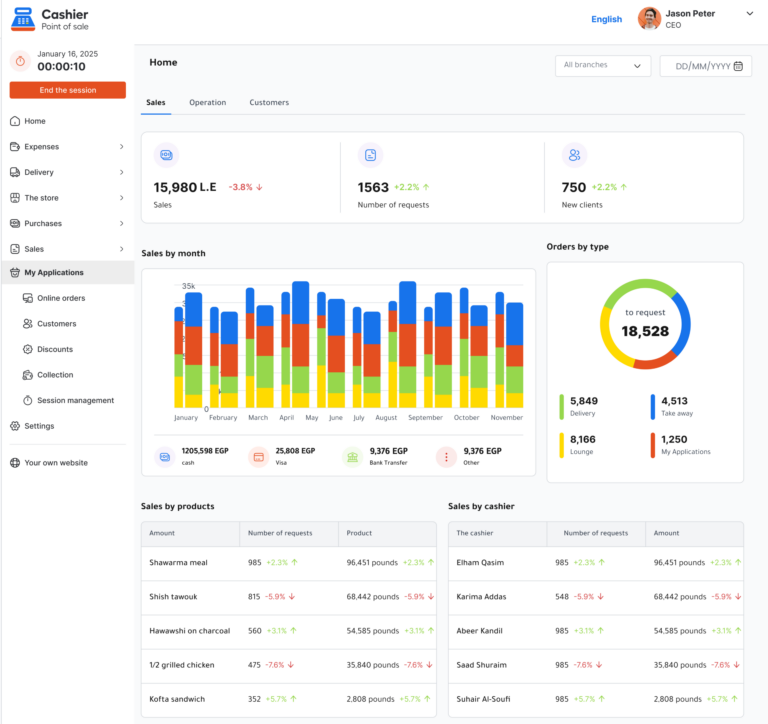
5. Sales Reports and Analytics
Data-driven decisions are crucial in retail. The best free POS software provides:
- Daily, weekly, and monthly sales reports
- Product performance analysis
- Profit and margin insights
These reports help supermarket owners identify trends and optimize operations.
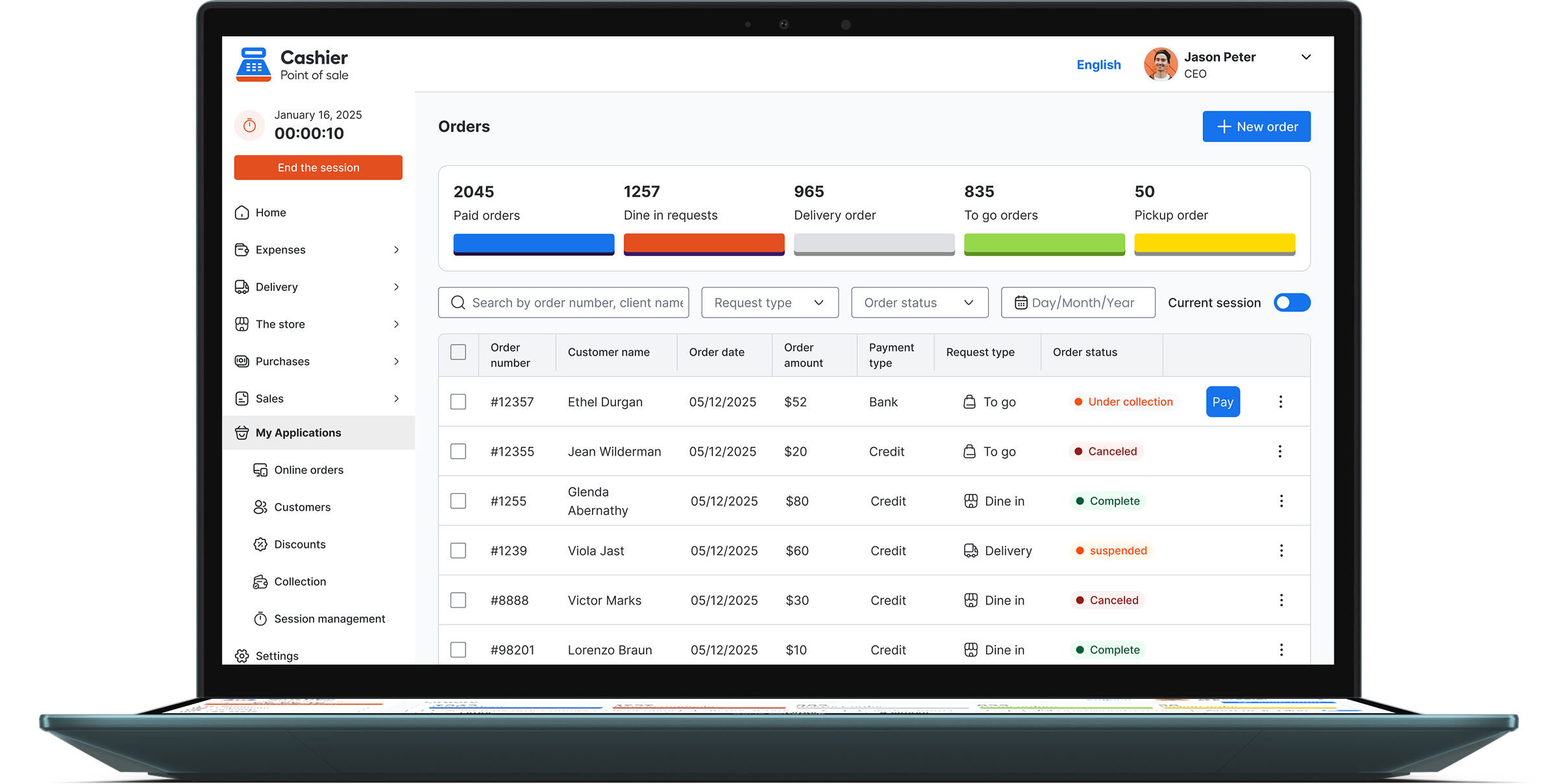
6. Multi-Device and Multi-User Support
Supermarkets often use multiple checkout counters. A good POS app supports:
- Multiple devices
- User roles and permissions
- Centralized data management
This ensures security and operational consistency.
Benefits of Using a Free POS System for Supermarkets
Many business owners assume that free software automatically means limited functionality or poor performance. In reality, modern free POS systems have evolved significantly over the past few years. Today, a well-designed free POS system can offer advanced tools that were once available only in expensive enterprise solutions, making them highly suitable for supermarkets and retail businesses.
Cost Savings
The most obvious advantage is cost reduction. A free POS system download eliminates licensing fees, subscription costs, and long-term contracts. This makes it ideal for startups, independent retailers, and small supermarkets that want to control expenses while still using professional-grade technology. The money saved can be reinvested into inventory, staff, or marketing.
Faster Implementation
Free POS apps are usually easy to install and configure, requiring minimal technical expertise. This allows supermarkets to go live quickly without lengthy onboarding processes or complex setup procedures. Faster implementation means less downtime and a quicker return on investment.
Scalability
The right free POS system grows with your business. As your supermarket expands, you can add more products, checkout counters, devices, and users without changing platforms or migrating data. This scalability ensures long-term stability and prevents operational disruptions as the business evolves.
Improved Accuracy
Automation significantly reduces manual errors in pricing, inventory tracking, and sales reporting. Accurate data leads to better stock control, fewer pricing mistakes at checkout, and more reliable financial reports. Over time, this improves operational efficiency, strengthens decision-making, and builds customer trust.
Why Cashier POS Is One of the Best Free Supermarket POS Solutions
Cashier POS is designed to meet the real-world needs of supermarkets and retail businesses. It combines simplicity with powerful features, making it an excellent choice for businesses looking for a free yet professional POS app.
Built for Retail and Supermarkets
Cashier POS supports large product catalogs, barcode scanning, and fast checkouts. It is optimized for high-volume retail environments where speed and accuracy matter most.
Online and Offline POS Functionality
One of the strongest advantages of Cashier POS is its ability to work both online and offline. Sales never stop, even during internet interruptions, ensuring business continuity.
Easy to Use POS App
The interface is intuitive, reducing training time for staff. Cashiers can process transactions quickly, while managers can access reports and inventory data effortlessly.
Cross-Platform Availability
Cashier POS is available as a mobile app, desktop application, and web-based POS. This flexibility allows supermarket owners to manage operations from any device.
Free POS System
Unlike many competitors that advertise free plans with heavy limitations, Cashier POS offers core supermarket POS features without hidden costs. This makes it ideal for businesses seeking a dependable free point of sale solution.
How a POS System Improves Supermarket Operations
Implementing a modern POS app goes beyond handling payments.
Better Inventory Control
Real-time inventory updates help supermarkets maintain optimal stock levels, reduce waste, and prevent lost sales due to out-of-stock items. A modern POS system automatically adjusts inventory with every transaction, giving managers instant insight into product movement. This level of visibility allows supermarkets to plan reorders more accurately, identify slow-moving items, and minimize losses caused by overstocking or expired goods.
Faster Checkout Experience
Speed is critical in supermarkets, especially during peak shopping hours. A reliable POS system minimizes queues by enabling fast barcode scanning, quick payment processing, and streamlined cashier workflows. Shorter wait times improve customer satisfaction, increase checkout capacity, and encourage repeat visits, which directly impacts overall revenue.
Smarter Pricing and Promotions
POS software allows easy management of discounts, bundles, and promotions, helping supermarkets stay competitive in a price-sensitive market. Managers can quickly adjust prices, schedule promotions, and apply discounts across multiple products or categories. This flexibility makes it easier to respond to market trends, supplier changes, and seasonal demand without manual effort.
Clear Financial Visibility
With automated reports, owners gain full visibility into revenue, costs, and profits on a daily, weekly, or monthly basis. Detailed financial insights help supermarket managers track performance, identify profitable products, control expenses, and make informed strategic decisions. Clear financial visibility is essential for long-term stability and sustainable growth.
Choosing the Right Free POS Software for Your Supermarket
Before selecting a POS system, consider the following important factors in detail:
- Does it support barcode scanning and large inventories, allowing you to manage thousands of SKUs efficiently without slowing down checkout operations?
- Can it work as an offline POS, ensuring uninterrupted sales during internet outages and automatic data synchronization once connectivity is restored?
- Is it easy for staff to learn, with an intuitive interface that reduces training time and minimizes operational errors at the checkout counter?
- Does it provide useful sales reports that clearly show revenue trends, best-selling products, and profit margins to support data-driven decisions?
- Is it scalable for future growth, enabling you to add more products, users, devices, and locations as your supermarket expands?
Cashier POS checks all these boxes and goes a step further by combining usability, reliability, and flexibility in one platform. This makes it a strong contender for supermarkets of all sizes, from small neighborhood stores to growing retail chains looking for a dependable free POS system.
Common Mistakes to Avoid When Selecting a Free POS System
Choosing Based on Price Alone
Free does not always mean suitable. Many supermarket owners make the mistake of selecting a POS system solely because it has no upfront cost, without carefully evaluating its functionality. A POS system should be assessed based on its features, long-term reliability, ease of use, and quality of support. Choosing a weak system can lead to operational issues, hidden costs, and the need to migrate to another platform later.
Ignoring Offline Capabilities
An online-only POS can disrupt sales during internet outages, which are more common than many businesses expect. In a supermarket environment, even short interruptions can result in long queues, frustrated customers, and lost revenue. Always prioritize offline POS functionality to ensure continuous operation, data protection, and automatic synchronization once the connection is restored.
Overlooking Reporting Tools
Without proper reports, it is difficult to measure performance and growth accurately. Sales reports, inventory insights, and profit analysis are essential for understanding what is working and what needs improvement. A POS system with limited reporting capabilities can prevent informed decision-making and slow down business growth over time.
Future Trends in Supermarket POS Systems
The POS industry continues to evolve as supermarkets adopt more advanced digital tools to remain competitive. Several key trends are shaping the future of supermarket POS systems and redefining how retailers manage daily operations:
- Cloud-based POS platforms that allow real-time access to sales, inventory, and reports from any location. Cloud technology also enables automatic backups, easier updates, and better collaboration across multiple branches.
- AI-driven sales analytics that help supermarkets forecast demand, identify buying patterns, and optimize product placement. These intelligent insights support smarter purchasing decisions and improved profitability.
- Integration with e-commerce and delivery platforms, allowing supermarkets to manage in-store and online sales from a single POS system. This unified approach improves inventory accuracy and creates a seamless omnichannel customer experience.
- Enhanced data security features designed to protect customer information, payment data, and business records. Modern POS systems prioritize encryption, access control, and secure cloud infrastructure to reduce risk.
Choosing a modern POS app like Cashier POS ensures your supermarket is prepared for future demands, technological advancements, and changing customer expectations while maintaining operational efficiency and data security.
Organize your sales in seconds with Cashier POS!
Take control of sales and users in moments, and give your business a fully integrated system that runs smoothly.
Get Started For FreeFrequently Asked Questions (FAQ)
The best free POS system is one that supports barcode scanning, inventory management, online and offline modes, and detailed reporting. Cashier POS is a strong option that meets these requirements.
Many modern POS systems, including Cashier POS, work on mobile, desktop, and web platforms.
Absolutely. Offline POS ensures uninterrupted sales during internet outages, which is critical in high-volume retail environments.
Yes, Cashier POS offers essential supermarket POS features without licensing fees, making it a reliable free point of sale solution.
Conclusion
Choosing the best free supermarket POS software is a strategic decision that directly affects efficiency, customer satisfaction, and profitability. A powerful POS app should do more than process payments; it should simplify inventory management, provide actionable insights, and support both online and offline operations.
Cashier POS stands out as a reliable and scalable free POS system built specifically for retail and supermarket needs. With its user-friendly design, robust features, and true cost-free model, it offers an ideal solution for supermarkets looking to modernize operations without increasing expenses.
By investing in the right POS system today, supermarkets can build a stronger, more efficient foundation for long-term success.